Teaching Software to Log Into Any Website
How Checkpoint uses AI reconnaissance to build deterministic login flows, then replays them inside a trusted execution environment, with no AI near your credentials.
10 min read
On this page
Every login page on the internet was designed for a human at a keyboard: someone who can squint at a captcha, check their phone for a code, and shrug when the page reorganizes itself overnight.
If AI agents are going to do real work on our behalf (pay an invoice, download a statement, check an order), they have to get through that login page first. At Multifactor, we built Checkpoint so that people and agents can use online accounts without ever holding the underlying credentials. To make that work, the system itself has to meet two bars at once: reliability, logging in successfully every single time, and scale, doing it across thousands of websites that each change on their own schedule. A flow that works 95% of the time fails someone every day; a flow that only works on the sites we hand-tuned doesn't scale at all. Self-healing is how we hold both bars.
Here's how it works.
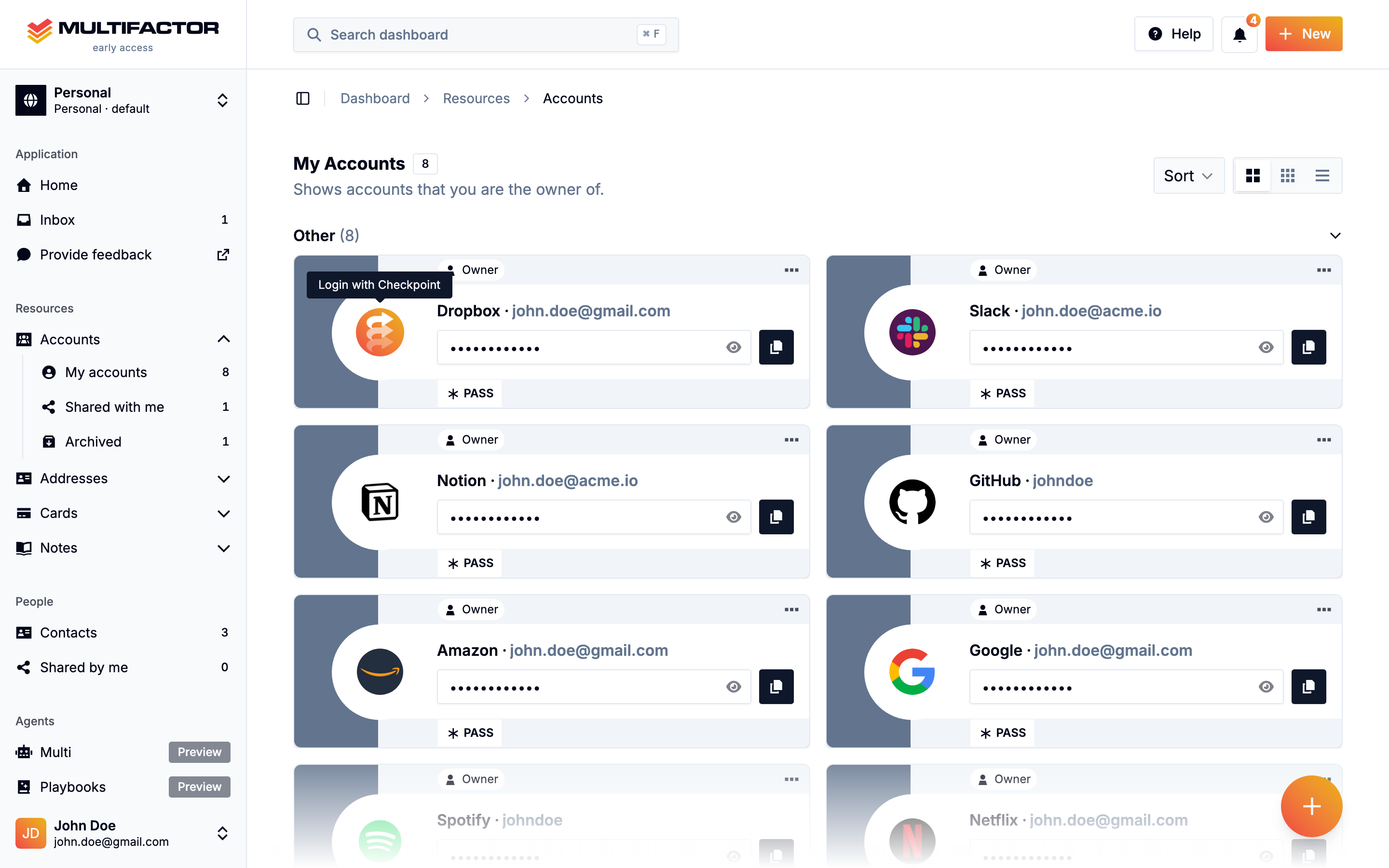
Every account in Multifactor offers “Login with Checkpoint”. One click, and the engine takes it from there.
Two naive options
A login flow sounds like three predictable steps: type a username, type a password, click a button. In practice, the definition of “login” varies widely from site to site. Login forms hide behind “Sign in” menus and JavaScript-gated modals. Some sites want your email first and your password on the next page. Some interrupt you with a one-time code and ask where to send it. Some want a passkey. Some redirect you through three domains before you land anywhere useful. And all of them change, constantly, without telling anyone.
There are two naive ways to automate this. Neither held up for us.
You can write a script against today's page. It breaks the first time the site ships a redesign, and you find out from your users.
Or you can point an AI agent at the account and let it figure out each login as it goes. Now a non-deterministic system is improvising with your real credentials, every day. AI is great at exploring unfamiliar websites. We still weren't comfortable running one on top of a customer's live account.
We split the problem so we never have to do either.
Recon: AI explores, ahead of time
We use AI as a reconnaissance step, before your credentials are ever involved. Our recon agent explores a website the way a careful human would: it finds the login page, works through menus and modals, identifies the sequence of fields and buttons, and maps the branches the site can take, from email-first flows to one-time-code prompts to multi-domain redirects.
We use the LLM at exactly the intersection where it belongs: reading a page and generating a map. Recon produces a deterministic flow: a recorded, auditable sequence of steps that describes exactly how to log into that website. The non-determinism stays in the mapmaking. The map itself is fixed, reviewable, and testable.
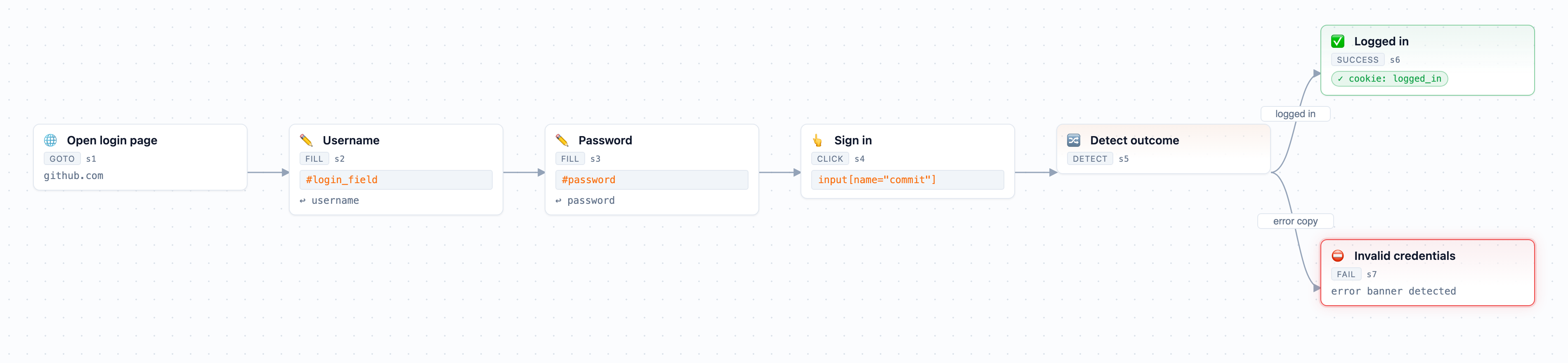
A real flow recon mapped for GitHub, shown in our internal flow viewer. Each node is one recorded step with a durable selector; credentials are referenced by name, and the detect step branches to a verified outcome.
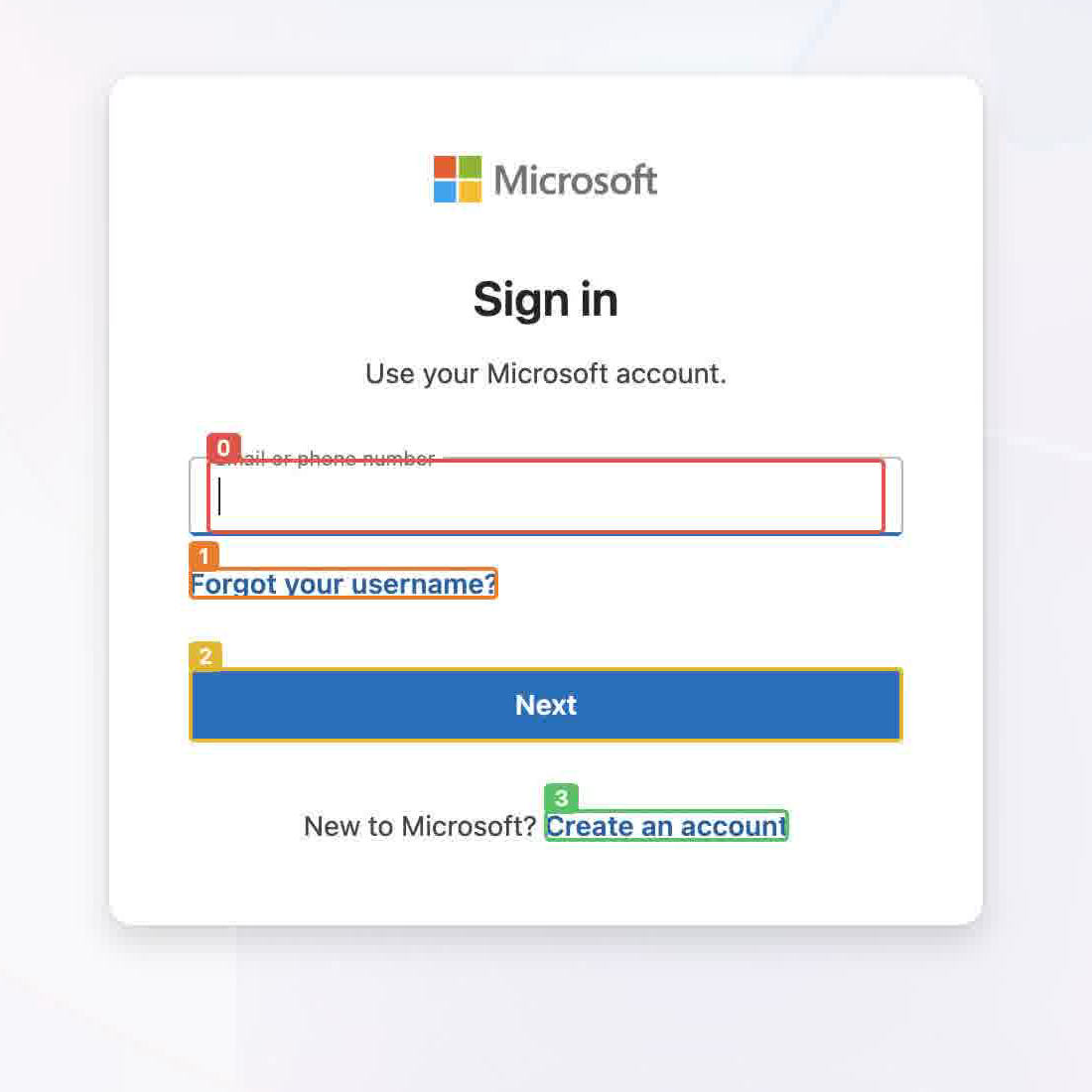
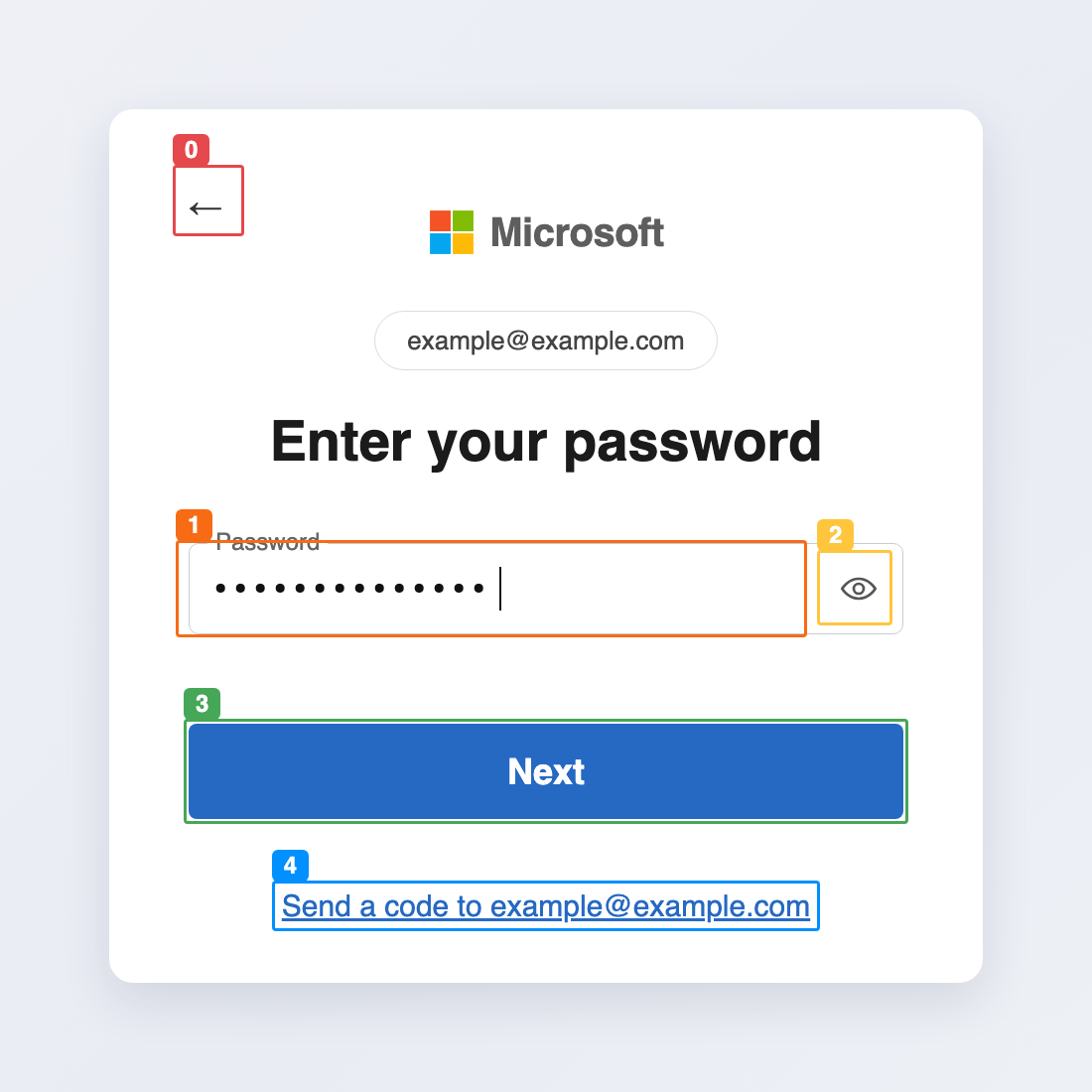
Recon in action: it reads and maps each step of the form. The numbered outlines are the interactive elements it sees, across the identifier and password steps.
A narrated walkthrough of a full recon run, from finding the login page to the mapped flow.
Transcript
0:00 — Hello everyone, this is Pierre from Multifactor. Today I'm going to be showing a demo of Logi logging in on Amazon using a cloud browser. So, as you can see, it asks for my username; I'm going to type it in. On my right side you can see all the CDP commands that we're sending through,
0:20 — and at the [unclear] you can see the flow — the deterministic flow, already trained and filled out for Amazon. So here I'm putting in my password; it was able to identify it as a password page. And for the next step, an OTP — I type in my code, and the next step means that I should be in.
0:42 — This flow specifically does not use any LLM; it's a deterministic flow, in which, in case it fails, we then send it to an LLM to heal.
0:52 — So at this point we're now logged in, and we're going to be returning the session to the agent.
And no map goes straight from the agent to your account. Every flow is exercised in our lab first, against the real website, using credentials we own: for each supported site, we register our own test accounts, and the lab drives the flow with those. No customer account is touched while a flow is being proven. Only after it passes there does a human review it and release it, individually, for customer use.
When a site redesigns its login page overnight, the lab is also where the repair happens. Our recon agent self-heals the flow there: it finds an alternate path from the failing step and splices it in as a new branch, keeping the original as a fallback. The healed flow then goes through the same gate as a new one; we review it manually and release it. The repair happens in our lab, never in your account, and once it ships everything is deterministic again.

The lifecycle loop: every flow is mapped, tested, and reviewed before release, and every failure feeds back into the same loop.
Runtime: deterministic replay inside a TEE
When you actually log in, the moment your real credentials are in play, there is no AI in the loop. Clicking “Login with Checkpoint” routes the session through an interception-layer proxy running inside a trusted execution environment (TEE), the same proxy architecture that keeps your credentials invisible even to us. Your credentials are decrypted only inside that enclave, the released flow replays through the proxy step by step, and the signed-in session that results stays inside Checkpoint, where sharing, permissions, and auditing are enforced. The raw session never leaves the enclave. The replay engine executes the recorded steps, verifies the outcome, and stops. Nothing improvises with your password.
The whole system reduces to one rule: non-deterministic exploration produces deterministic flows, and only deterministic flows ever touch your credentials. The rule also happens to make logins fast. Recon takes about a minute, once per website. Replays take seconds, every time.

The pipeline: AI maps, the lab tests, a human releases, and the runtime replays — deterministically, inside a TEE.
The web is hostile input
There's a second reason we refuse to put an LLM in the login path, and it has nothing to do with reliability: every web page an agent reads is untrusted input.
A page can lie. It can render a fake “you're logged in” banner, disguise a phishing form as a login form, or hide instructions inside its HTML that are invisible to a human but read by any LLM that processes the page. This is prompt injection, and for browser agents it's not theoretical: a model that both reads attacker-controlled content and holds your credentials can be talked into misusing them by the very page it's looking at.
Our architecture treats this as a given rather than something to filter for. During recon, the agent reads untrusted pages, but it holds nothing worth stealing: no customer credentials, no customer session. The worst a malicious page can do is corrupt a map, and a corrupted map still has to survive our lab, produce verifiable evidence, and pass manual review before it ships. At runtime, the situation inverts: the replay engine holds the credentials, but it doesn't interpret language at all. It executes recorded steps. There is no prompt to inject, because there is no model reading the page.
At no point does a single component both read the untrusted web as language and hold your secrets.
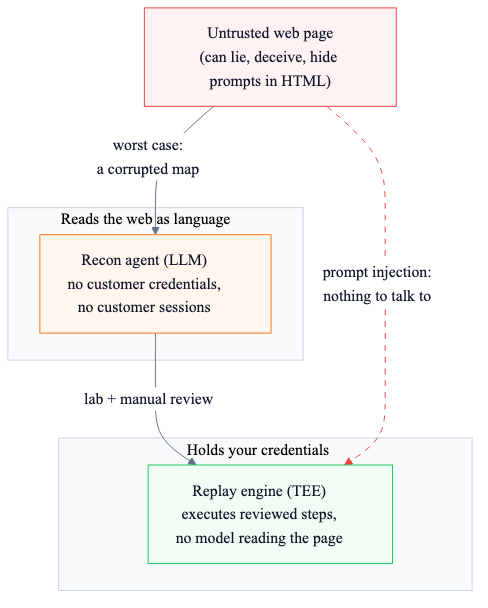
The split: the component that reads the web holds nothing worth stealing, and the component that holds your credentials reads no language.
Listening to the network
Pages lie about login state more often than APIs do. A rendered “welcome” banner is easy to fake and easy to break; the fact that /api/me returned 401 before login and 200 after is neither.
Alongside the DOM, the engine watches the site's own network traffic and mines it for authentication signals. It never records request bodies or values, only shapes: a normalized endpoint pattern with ids stripped out, whether the request carried authentication, the status code, and which top-level JSON keys went from empty to populated. Diffing that traffic across the login boundary yields the strongest evidence we have. An endpoint that only ever fires with credentials after login, or one that flips from 4xx to 2xx, is a session signal no UI reskin can break.
Analytics beacons, chat widgets, consent banners, and captcha hosts are filtered out first; they load asynchronously on every page and would otherwise drown the signal. What remains is ranked above everything else in the evidence model: network first, cookies and storage second, DOM last.
Verifying success with evidence
After submitting a login form, most automation tools wait to see what the page does. Waiting is slow, flaky, and easily fooled; plenty of sites show a spinner, a redirect chain, or an interstitial that looks nothing like success or failure.
Our engine collects evidence instead. While a flow runs, it probes for concrete signals: an element that only exists for signed-in users, a session cookie appearing, a change the login itself caused. Success is declared only when the evidence supports it, and the evidence has to clear a high bar. A signal that was already present before the login attempt doesn't count, and no personal information is ever recorded in it. Failure works the same way: the engine looks for the error message itself instead of guessing from a timeout.
When the app tells you a login succeeded, that claim is backed by verified signals from the page.
Codes, passkeys, and captchas
Most of our engineering time goes to the cases that break other automation tools.
One-time codes
When a site asks where to send your verification code, the flow recognizes the choice, matches it to the destinations you've configured, and refuses to guess. If it can't confidently match a destination, it stops and asks you rather than firing a code at the wrong phone number. If you've imported an authenticator (TOTP) secret into your vault, Multifactor generates the code itself and the login stays fully automatic.
Passkeys
Checkpoint performs WebAuthn passkey logins inside the same trusted environment, using a credential that never leaves your encrypted vault. Passkeys were designed to be unphishable and device-bound, and the replay preserves both properties.
Captchas and bot walls
Sometimes a website demands a human. The engine detects blockers rather than fighting them, and hands control to you at exactly that step. You solve the captcha in the live browser view, confirm, and the flow continues.
Through all of this, credentials stay under your control: when the engine needs a secret from your vault mid-flow, you see exactly what it's reading and approve it explicitly.
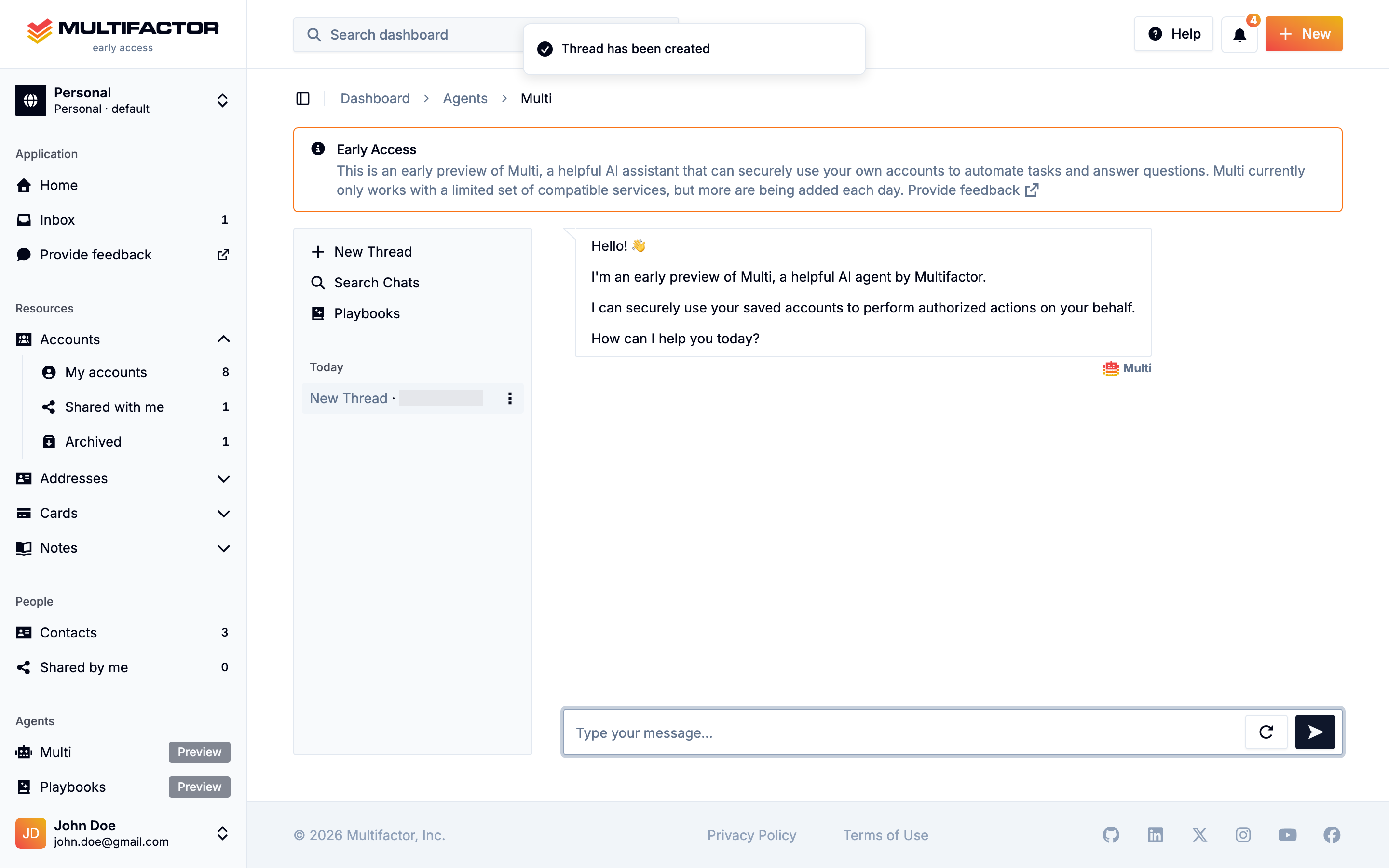
Multi uses learned login flows to complete real tasks with your accounts, while you watch, approve, and stay in control.
Measuring it
A demo of an agent logging into one website is easy to make. What we actually needed to know was our success rate across thousands of websites, before our users found out for us.
So we built evaluation infrastructure alongside the engine from day one: a fleet of synthetic login sites that reproduce the web's nastiest patterns (multi-step forms, modals, OTP branches, hostile error states), plus rubric-based scoring of every run. Every change to the engine is measured against the full corpus before it ships. When a real-world login fails, telemetry lets us replay what the recon agent saw and did, step by step, and turn the failure into a new test case.
For what it's worth, the agent turned out to be maybe a third of our work. The verification model and the evaluation harness were the rest, and we didn't see that coming.
Where this goes
An engine that can log into any website, without running AI on top of customer accounts, is the foundation for everything Multifactor is building: Checkpoint sharing without credential exposure, secure agentic account use, and, eventually, accounts that work for you and for the agents you trust, with no password ever typed into a phishing page again.
To watch it work, open any account in Multifactor and click “Login with Checkpoint.” The first login builds the map; every one after that is just fast.
We're redefining zero-trust — so you can protect your accounts with confidence.
Identity is your first and last line of defense, and the root cause of most application security breaches. Multifactor's provably secure zero-trust solutions cryptographically guarantee that only authorized users can access sensitive data, turning identity into your greatest asset in the fight against cyber threats. Learn more about our research, or reach out to explore working together.
Related Posts

We're Hiring
2026-03-02
Multifactor is hiring. If you are a talented engineering leader or individual contributor who cares deeply about forging the future of authentication, authorization, and auditing for the agentic era, you should probably check out our open positions.

Multifactor Versus Password Managers: Securing Capabilities, Not Credentials
2026-01-31
Say goodbye to password managers and hello to Multifactor, the world’s first true Account Manager!

Meet Multifactor: Putting Your Digital Life on Autopilot
2025-10-31
A closer look at the platform designed to unify and secure your entire digital identity.