ResearchAuthorizationAuditingCheckpoint
Mapping the actions behind Amazon’s website
How we approached coverage, request classification, and parallel exploration while building a map of Amazon’s user actions.
8 min read
On this page
As part of our mission to make sharing accounts with agents safer, we have to deeply understand what each website offers as actions. That is, if we're giving permission for an agent to fetch an invoice from Amazon, it can only do that. It shouldn't be able to place orders, change payment methods, or cancel subscriptions. Today, we hand it the account and trust that it will only do what's asked. To build a safeguard, we first need to understand and map all actions that you can take on a website. That map is what a crawler builds, and internally we call ours Scouti. It walks a site surface by surface, recording the actions each one exposes. A surface is any page or view you can land on, like the "Your Account" or "Your Orders" pages. An action is a single thing you can do there, like fetch an invoice, add to cart, or cancel a subscription.
Amazon is a hard place to build that map, which is why we used it. Lots of different surfaces, each with its own layout and a different set of controls, and even more deep links below. The "Your Orders" page might change what it offers depending on which order is open and what state it is in.
As we started this project, we nailed the three requirements for success:
- Breadth across all surfaces: we should be able to navigate to a surface, find all controls, then find all possible surfaces and queue each one up.
- Accuracy: modern websites are insanely network-heavy. That's true as modern developers use all sorts of signals to understand how their product is being used, from analytics telemetry to error reporting or even session replay. We should be able to distinguish them from real actions (we might call actions "entitlements" later on). Once we identify an action, we have to understand the shape of the requests it triggers, and use frequency to find the variation over time.
- Speed: we want these runs to finish inside a real budget.
The rest of this is the story of chasing those three at once on one hard site. Let's start where a crawler does, on the "Your Account" page.
One page, many branches
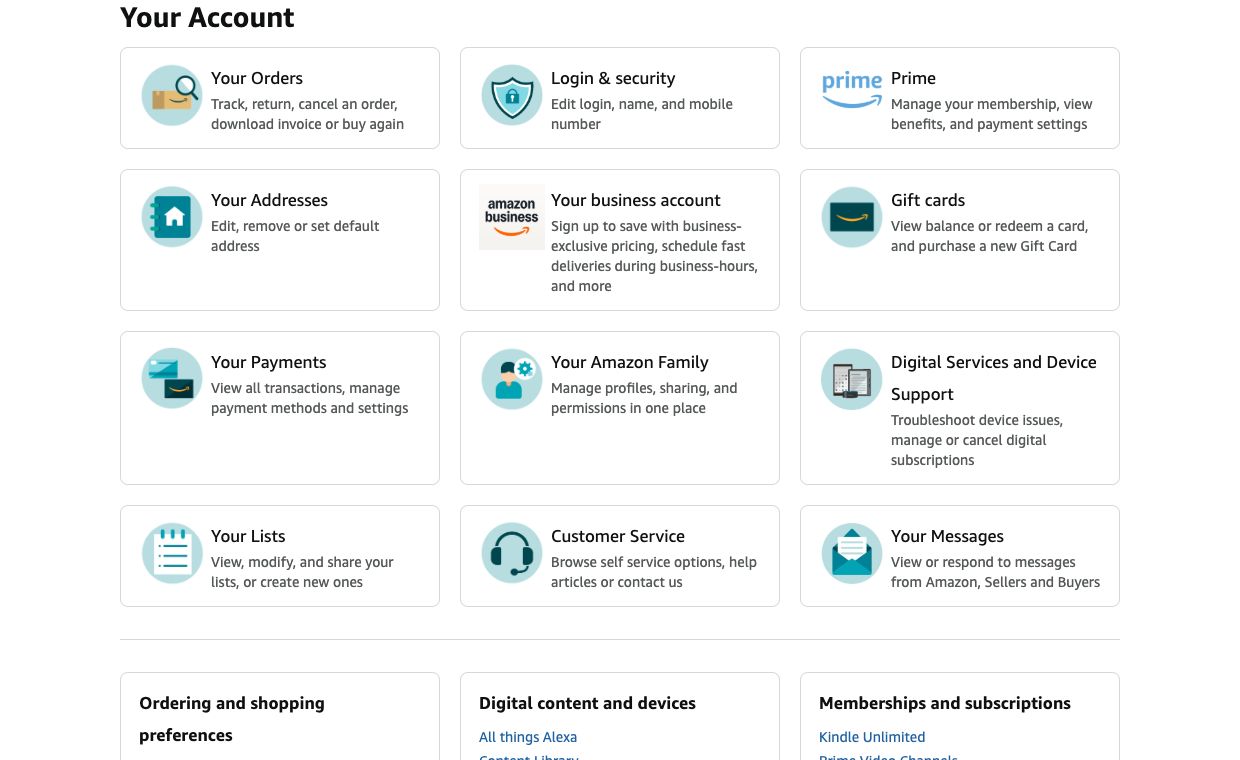
- 1Orders
A hub for tracking, returns, cancellations, invoices, and buying again.
- 2Login & security
A separate branch with a different risk and authentication context.
- 3Amazon Family
Follow the branch into profiles, sharing, and permissions.
- 4Lists
Viewing, editing, and sharing a list need distinct action identities.
Breadth: discovering every surface
Creating a comprehensive map of every possible action you can take on a website like Amazon is nontrivial because the definition of “map complete” is not objective.
Counting pages is not correlated to how much of a website you’ve mapped. Every product page shows the same actions (add to cart, buy now, etc) while a single “Your Account” page shows multiple unique actions like credit card information and shipping address.
Actions can lead to a recursive loop of nested actions. Finding one action like “Your Orders” is easy, but nested actions underneath like pick an order or download an invoice can be tricky to map. To make matters worse, these actions can behave differently depending on the account state. A delivered order is an action that has different nested action than an order that’s still shipping. So coverage runs on two axes: breadth across the account's areas, and depth inside each one. And the evidence gets graded, because there's a real gap between spotting a link and opening it, and a wider one between opening it and proving what its controls actually do.
Not all websites can be mapped as a single account. Amazon.com gives you access to multiple services like Seller Central, AWS and Twitch. If Scouti didn’t know the boundaries between each service, it can spend endless hours and tokens trying to map all of these services.
Some actions can destructively change the account. It’s important that Scouti map actions like change password or delete account, but how do we map these actions without literally changing the password or deleting the account? The crawler works behind a proxy that can block outgoing network requests like these. Read traffic passes straight through to Amazon, but a request that would change account state gets held at the proxy and recorded as evidence instead of being sent. The action still lands in the map. The account never moves.
Holding mutating requests at the proxy
The crawler maps the account without changing it. When an interaction would write to Amazon, the proxy recognizes the request, holds it, and records the action as evidence. Nothing reaches the site.
Accuracy: knowing what each control does
Finding a control is not the same as knowing what it does. Amazon’s language settings are three interactions inside one form: choose a language, save it, cancel. Opening the form only tells Scouti that a control is there. To actually map the action, we have to prove that saving the preference changed something.
Three controls, three meanings
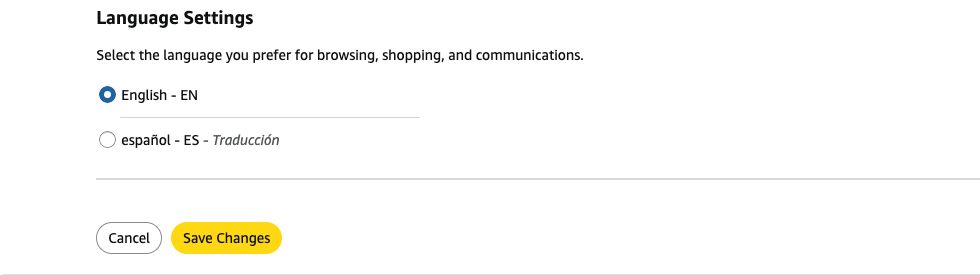
- 1Choose a value
A selection is a candidate interaction. Observe whether it sends traffic or only changes the form.
- 2Save Changes
An intended preference change. Identify its request and verify the resulting setting before calling it validated.
- 3Cancel
A navigation exit. It must not inherit the meaning of saving the setting.
The browser tells us what the agent tried, and the proxy captures the requests that attempt produced. We use both to propose an action, then check whether the evidence backs it up. A button label hints at intent, but a 200 response doesn’t prove the state actually changed.
Most of what a browser does isn’t the action at all. Opening a single order page sets off a flurry of other traffic (images, config, a stream of performance beacons), most of it firing within milliseconds of the click, and none of it something a user would call an action. One early Amazon crawl caught GET /rd/uedata sitting right next to the real order and account routes. It just reports page-load latency, but if Scouti had treated it as a capability, we’d be granting a permission that has nothing to do with fetching an invoice.
One Amazon action, several kinds of traffic
An order-history interaction can sit among navigation, page metrics, and supporting resources. Only the evidence for the intended action belongs in its permission pattern.
So Scouti sorts action evidence apart from navigation, assets, telemetry, and infrastructure. Each kind has its own job (navigation finds surfaces, background requests keep the site running), and none of them belong in the permission that lets an assistant view an order. You can’t sort them by hostname or timing either. Amazon can serve an order request and a performance beacon from the same host, and the beacon can fire the instant you click. What separates them is the role each request plays in the interaction, and we review that before calling anything an action.
Even the real requests are ambiguous. Our captures held both /gp/css/order-details and /your-orders/order-details for the same thing: viewing an order. If Scouti treats them as two permissions, it duplicates one action. If it collapses every order route into one, it loses the line between viewing an order and cancelling it.
Different requests can mean the same action
An Amazon order can be reached through different routes. Group by the user’s intent while retaining the request shapes that support it.
Parameters carry the same risk. One pattern we kept for filtering order history used GET /your-orders/orders with timeFilter present and orderFilter absent. A different date range is the same action, but a different selector is a different action. So a good pattern keeps the fields that identify the action and lets the values that legitimately vary move around.
Your Orders
What tells them apart is repetition. A referral parameter that only shows up once drops out of the action’s identity, while a date filter stays in even as its value keeps changing. And we don’t trust a pattern until it has matched interactions beyond the one it came from. A rule that can only reproduce its own original capture hasn’t really been shown to recognize anything.
Speed: finishing inside a budget
Breadth and accuracy both take time, and time is limited. Every surface you open leads to more surfaces to inspect, and each one has its own evidence to check. Scouti can spend its whole budget just finding pages and end up with a long list of them but almost no actions you can use.
Our first version made that worse because it kept a whole crawl inside a single agent conversation. That did not scale. In one Amazon run the agent hit roughly 300,000 input tokens and stalled at turn eleven, after leaving the landing page exactly once. It used up the budget without mapping much. So we moved the exploration state out of the conversation and into a controller: a shared queue of surfaces that hands work to agents with fresh context. An agent inspecting Orders needs the task, the account context, and the evidence for that branch, not the transcript of some other agent reading language settings. With the state kept outside the conversation, workers take bounded tasks and hand the surfaces they find back to the queue.
Explore Amazon’s branches in parallel
Orders, preferences, and digital services share a work queue. Sixteen browsers pull from it in parallel, and a child surface becomes available only after its parent reveals it.
That also lets independent branches run at once. Each worker runs its own browser behind its own capture proxy, writing to a directory only it touches, so its clicks stay tied to its traffic. When one worker finds a new surface, a free worker can pick it up without waiting on the first. How much this helps depends on the site. A worker still can't inspect a page it hasn't found yet, and parallelism can't get past a reauthentication wall. And two workers on the same account can overwrite each other's state. Dependencies like these decide which interactions are safe to run at the same time.
What the map is for
Put the three together and here’s what Scouti hands an assistant fetching an invoice. There’s a single action it can name, and underneath it the request patterns that carry it out, tied back by evidence to the task itself. The map also carries its own limits: the branches that needed more authentication, and the ones still unexplored when the budget ran out.
The expensive part, exploration and reasoning, happens offline. A runtime proxy then uses the resulting action library to identify each request and check it against the account owner's policy. Discovering how a site behaves stays separate from the owner's decision about what to allow.
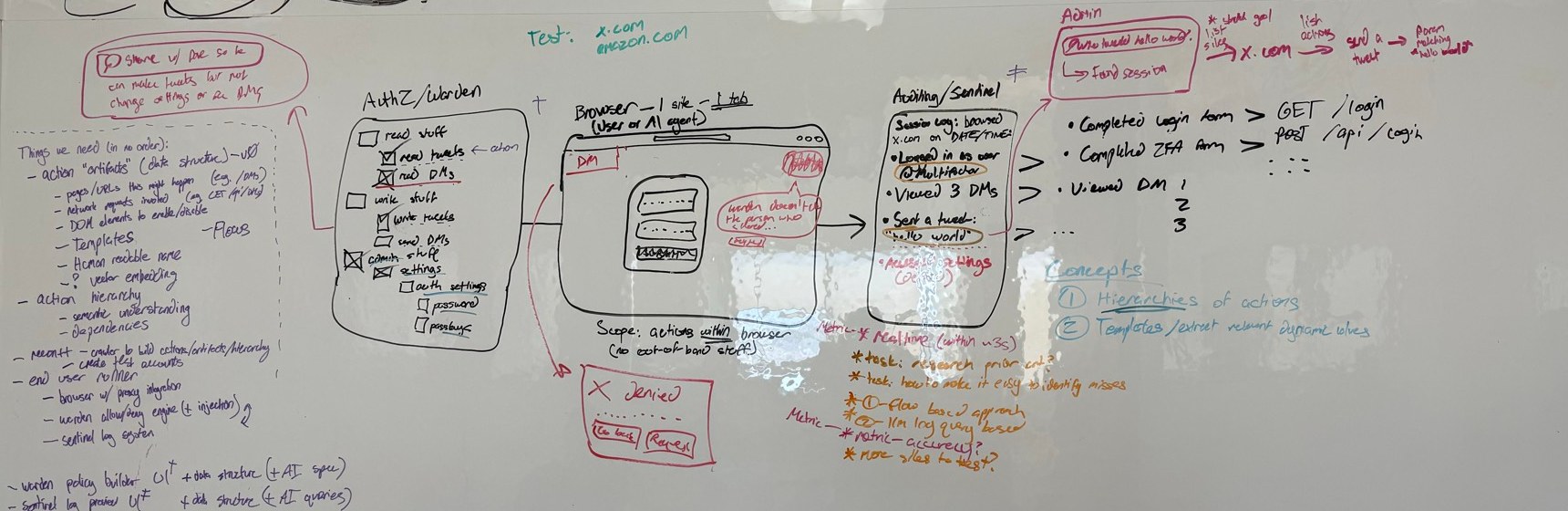
An early research sketch of that boundary: discover and organize actions, then evaluate them against a policy. The diagram describes the architecture we were working toward.
Amazon showed us how tightly the three requirements pull on each other. The deeper a crawl goes, the more candidates pile up to classify, and the more browsers we add, the more traffic there is to trace back to a real action. No run ever maps everything, so the honest ones end by saying where they stopped. That’s what Scouti is: a crawler that reports the actions it can support next to the work still left to do. And it gets us closer to what we wanted from the start, an agent you can hand your account and send for the invoice, trusting it can’t do anything else.
For more about the research sprint, read Lock-In Week.
We're redefining zero-trust — so you can protect your accounts with confidence.
Identity is your first and last line of defense, and the root cause of most application security breaches. Multifactor's provably secure zero-trust solutions cryptographically guarantee that only authorized users can access sensitive data, turning identity into your greatest asset in the fight against cyber threats. Learn more about our research, or reach out to explore working together.
Related Posts
Introducing Checkpoint: A Better Way to Share Online Accounts
2025-07-07
Checkpoint uses novel cryptographic techniques to enable easy revocable, non-repudiable, and fine-grained sharing of any online account resource.
How to Share an Account With Your Agent and Know What It Did
2026-09-15
Checkpoint gives your agent scoped access to any online account, enforced at the network layer inside a trusted execution environment, with a verifiable log of every action it took.
Introducing Notary: Proving What Code a Cloudflare Worker Is Running
2026-09-30
Cloudflare Workers are fast and scale on their own, but nothing lets a third party check what code a Worker is running. Notary pairs a Worker with TEEs so anyone can cryptographically verify the code that is live on a domain.